Create autorun CD / DVD: from a simple CD menu to a smart CD brochure 
Creating an autorun / autoplay CD or DVD with CD Front End is very simple. 
You can create / show rich brochures; simple or complex CD menus to show documents, songs, movies, any kind of audio, video, WMV, AVI, MPEG, MP3, PDF, DOC, ZIP, PPS... ; catalogs, manuals and much more.. 
 
In this tutorial we will create a basic CD step by step. 
 
a) create a new temporary folder with the MSWindows File Explorer (File >New >Folder), say c:\MyTemp 
 
b) install the CDFrontEnd program (!) 
 
c) now you can run the program and you can create a presentation document. 
It could be a complex brochure... In this case, please see the PDF manual or the rest of this manual in order to learn about all the other CD Front End features. 
 
Or it could be a simple menu, such as a list of buttons or links. 
E.g. you could type something like: 
- click here to see the Abcd PDF document 
- click here to see the Fbertdsds PPS presentation 
- click here to see the Rurrt Guuyy AVI movie 
 
Then you could highlight with the mouse or with the arrow keys each sentence (e.g. start with "click here to see the Abcd PDF document"), and use "Insert >Link to embedded file": this permits you to browse the hard disk and to select the file to be assigned to the link (for a more professional way to run / link files, see "How to run files"). 
 
d) should you want the CD to be shown "full screen" without any top menu, check the relevant check boxes in "Hypertext >Current Hypertext Properties" ("Reader screen" tab); 
 
e) Use "File >Create autorun CD in temporary folder...". You will be prompted for a temporary folder that will contain the copy of the CD. Choose the c:\MyTemp you created in step a). 
The program will show a dialog like this: 
autoplay CD creation 
 
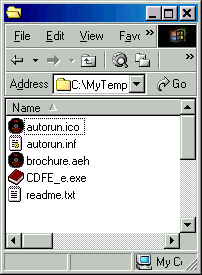
You may choose "Browse..." to take a look at the temporary copy of the CD: 
The autorun CD in the temporary folder 
 
And you may also use "Test" to test the CD prior to the actual burning: please understand that some features such as the "external links" don't work in test mode. 
 
f) Open EasyCD (or Nero, or WinOnCD) and burn the temporary folder into the root of a CD. In the simplest case, the root (= main folder, the space that does exists in the CD even if there are no specific folders) of the CD will contain the files: 
autorun.ico 
autorun.inf 
brochure.aeh 
CDFE_e.exe 
readme.txt 
In case you use links to "external files" then remember to include in the CD also these files, and folders, if any. 
 
g) Close all programs, insert the CD in the drive, and enjoy!! 
 
 
That’s all. It’s really a snap!!! 
Additionally, if you want you may distribute the AEH file (the work file you save with "File >Save all"). It can be read with the free EBooksReader (TM).  
It is analogous to PDF and Acrobat Reader (TM). 
 
 
Tutorials 
 
CDFrontEnd Manual - Main menu - Search - What is CD Front End? - Overview - Buy / register - Frequent questions / FAQ - Tutorials - CD passwords - protect presentation - Get CDFrontEnd electronically - Get the CDFrontEnd CD -  User's Web forum - CDFrontEnd Web site 
create catalogs Software: create Website, CD, catalog, ebook, manual, brochure Hypertext authoring software dvd mp3 antispam spy wmv create dvd cd front end autorun cd cd product reference cd dvd menu autoplay cd dvd make cd CDROM presentation autoplay cd dvd presentation menu create CD brochure create CD business card visual autorun cd menu ebook software Ebook e-book software create ebooks create ebooks Ebook editor software visual ebook editor and compiler e-book compiler ebook software e-book collection library Create CD / Web catalog CD / Web product catalog software Create hypermedia hypertext CD / Web catalogue catalog create business CD DVD Web catalog Create catalogs CDROM builder software Catalog builder software Create make a CD DVD catalog Web page design software Web site design software program create Web page fast Web editor Create a Web site, client and server software Web site software Web site editor software build Web site Website builder software Web site software Website builder software Create your own Website Web Website publishing software Create software manual, WinHelp, Html Help Make online manual Create a manual, software HTML Help compiler, CHM Create Html Help Help system software Creare un sito Web, CDROM, catalogo, manuale, ipertesto Creare CD sito CDROM catalogo, programma per Realizzare CD sito Web aziendale CDROM catalogo, software per Creare pagine Web, programma per Costruire pubblicare pagina Internet,creare sito Web, software per Creare manuali, WinHelp, Html Help, software per Fare un manuale, programma per Creare ebook e-book libri elettronici, software per Risorse software shareware,siti shareware testo canzoni Software commerciale shareware e freeware Locali Spettacolo Concerti Uscire Soluzioni semplici Recensioni film Programmi software borsa soldi Crea un catálogo, hypermedia CD, Sitio Web crear un sitio Web profesional programa sitio Web programa páginas Web crea páginas Web personales, para el Internet crear manuales y archivos crea los CD autorun (auto-iniciantes) presentaciones folletos crear publicar ebook elibro libros electrónicos programa ebook crear ebook logiciel web créer un catalogue, hypermedia CD, site Web créer vos site  Web professionnel créer site web créer pages web internet créer fichiers d'Aide Windows et HTML, manuels créer présentation, brochure, CD DVD démarrage automatique logiciel démarrage automatique autorun autoplay CD DVD menu Logiciel pour l'édition de livres électroniques ebook cinema 
CD Front End - Create autorun CD DVD presentations, menus with ease.  http://www.CDFrontEnd.com 
(C) Copyright 2001, 2009 Visual Vision. All rights reserved. 
Since 1996, leader in hypermedia software - ASP member - ESC member 
 
Other easy tools from Visual Vision: 
CD Web catalog software HyperPublish: create a product items catalog, an hypermedia CD DVD, a Web Site 
create website 1site: create a professional Web site, business ecommerce Website 
Web site software EasyWebEditor: create personal Internet pages, create your Web site in minutes 
ebook software EBooksWriter: create a self-installing ebook with ease! 
manual software, documentation PaperKiller: create a manual and/or Html Help, a guide, reference manuals 
helpfile software, create online documentation RoboAuthor: manage software documentation, Helpfile, CHM, data sheets 
 
Leader in auto run CD DVD software - CD presentation catalogue brochure business card password print copy protection 
CD FrontEnd software makes it easy to write, edit, protect and distribute any kind of information