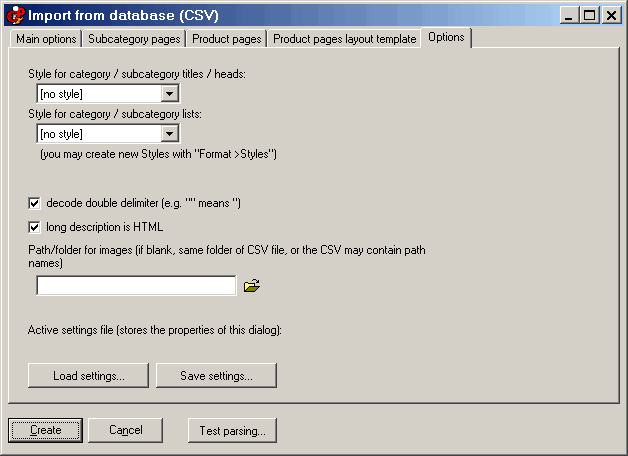
CSV - Database import, “Options” tab 
Within this tab you can set some additional options. One is the folder that contains the images (by default, this field is empty, and the folder is the same folder that contains the CSV file - you can load the CSV with the button on the top left of the first tab). Click on the image in order to see the other tabs, and for more information. 
CSV - Database import “Main options” tab CSV - Database import, “Subcategory pages” tab CSV - Database import, “Product pages” tab CSV - Database import, “Product pages layout template” tab you may set a text style for Heads and texts (for categories’ and subca “decode double delimiter” means that if the fields within a CSV record Styles  
 
As you can see, with this tab you may set a text style for Heads and texts (for categories’ and subcategories’ pages). You can choose from the existing styles - if you need additional styles, please exit from this dialog and use “Format >New style”. 
 
Then you can say if the long description is normal text (line breaks - CR LF are not allowed) or HTML (only basic tags are allowed, such as <font> <b> <i> etc. ). 
 
“decode double delimiter” means that if the fields within a CSV record are delimited with “, a “ it is coded with a double instance, e.g. 
“field1”,”field 2 with some words here “”real quotation marks”“ and some other words”, ”field 3”; 
 
With the buttons on the bottom left, you can Load and Save the settings of the CSV dialog. 
 
 
CSV - Database import main page 
Frequently asked questions 
Tutorials 
 
CDFrontEnd Manual - Main menu - Search - What is CD Front End? - Overview - Buy / register - Frequent questions / FAQ - Tutorials - CD passwords - protect presentation - Get CDFrontEnd electronically - Get the CDFrontEnd CD -  User's Web forum - CDFrontEnd Web site 
 
CDFrontEnd - Create autorun CD presentations with ease.  http://www.CDFrontEnd.com 
(C) Copyright 2001, 2006 Visual Vision. All rights reserved. 
Since 1996, leader in hypermedia software - ASP member - ESC member 
 
Other easy tools from Visual Vision: 
CD Web catalog software HyperPublish: create a product catalog, an hypermedia CD, a Web Site 
create website 1site: create a professional Web site, business ecommerce Website 
Web site software EasyWebEditor: create personal Internet pages, create your Web site in minutes 
ebook software EBooksWriter: create an ebook with ease! 
manual software, documentation PaperKiller: create a manual and/or Html Help, a guide, reference manuals 
helpfile software, create online documentation RoboAuthor: manage software documentation, Helpfile, CHM 
 
Leader in auto run CD software - CD presentation catalogue brochure business card password print copy protection 
CD FrontEnd software makes it easy to write, protect and distribute any kind of info on a protected autorun CDROM! Professional brochures, cd business cards, catalogs, manuals, depliant, ebrochure, emanual, ecatalog, products items parts catalogues. You can run any kind of external file, too... PDF, PowerPoint, Word, Autocad... It is ok for content rich business brochures, art show catalogs, collections, guides, tourism and travel books, also with audio, video, animations, flash, mpeg wmv avi mp3 and much more... The perfect visual auto run / autoplay / autostart / autoinstall CD ROM presentation software! Free lite edition available.