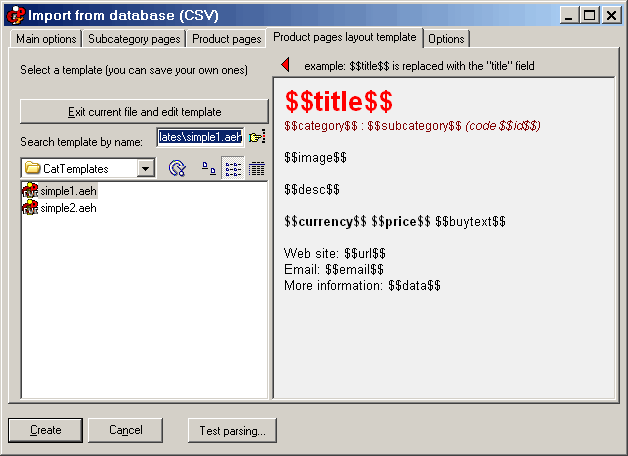
CSV - Database import, “Product pages layout template” tab 
Within this tab you can choose a template for the automatically generated product pages. The template is simply a “single page” AEH file saved within a particular folder. Within the text you can insert special symbols such as $$title$$ that will be replaced with the database fields. These symbols are listed on the bottom left of the first tab
Click on the image in order to see the other tabs, and for more information. 
CSV - Database import “Main options” tab CSV - Database import, “Subcategory pages” tab CSV - Database import, “Product pages” tab CSV - Database import, “Options” tab with a click on this button you exit the CSV import dialog and you edit this is the selected template.  
 
Some interesting things: the text $$image$$ is replaced with the image. Depending on the settings on the “Product pages” tab, the image will be the full image, or a scaled image that links to a popup window that will show the large image. 
If the CSV contains cart information (short product description, identifier, price), the program can place a buy link ($$buytext$$) or a buy image ($$buyimage$$) that link to the internal cart. 
The CSV may also contain a direct “cart URL” that could point to a web script / web cart. This URL may be attached to a buy link or a buy image (see the ”product pages” tab). 
 
You may also use another image, $$auximage$$. This will be always inserted “as is”. 
 
Additional useful fields: 
$$contentslink$$ - inserts a link to the main index page 
$$catlink$$  - inserts a link to the related category page 
$$subcatlink$$  - inserts a link to the related subcategory page 
$$gonext$$ - forces the program to load a new record so you may insert more than one product per page (lexicographic order) 
 
 
CSV - Database import main page 
Frequently asked questions 
Tutorials 
 
CDFrontEnd Manual - Main menu - Search - What is CD Front End? - Overview - Buy / register - Frequent questions / FAQ - Tutorials - CD passwords - protect presentation - Get CDFrontEnd electronically - Get the CDFrontEnd CD -  User's Web forum - CDFrontEnd Web site 
 
CDFrontEnd - Create autorun CD presentations with ease.  http://www.CDFrontEnd.com 
(C) Copyright 2001, 2006 Visual Vision. All rights reserved. 
Since 1996, leader in hypermedia software - ASP member - ESC member 
 
Other easy tools from Visual Vision: 
CD Web catalog software HyperPublish: create a product catalog, an hypermedia CD, a Web Site 
create website 1site: create a professional Web site, business ecommerce Website 
Web site software EasyWebEditor: create personal Internet pages, create your Web site in minutes 
ebook software EBooksWriter: create an ebook with ease! 
manual software, documentation PaperKiller: create a manual and/or Html Help, a guide, reference manuals 
helpfile software, create online documentation RoboAuthor: manage software documentation, Helpfile, CHM 
 
Leader in auto run CD software - CD presentation catalogue brochure business card password print copy protection 
CD FrontEnd software makes it easy to write, protect and distribute any kind of info on a protected autorun CDROM! Professional brochures, cd business cards, catalogs, manuals, depliant, ebrochure, emanual, ecatalog, products items parts catalogues. You can run any kind of external file, too... PDF, PowerPoint, Word, Autocad... It is ok for content rich business brochures, art show catalogs, collections, guides, tourism and travel books, also with audio, video, animations, flash, mpeg wmv avi mp3 and much more... The perfect visual auto run / autoplay / autostart / autoinstall CD ROM presentation software! Free lite edition available.