Create autorun CD / DVD: from a simple CD menu to a smart CD brochure
Creating an autorun / autoplay CD or DVD with CD Front End is very simple.
You can create / show rich brochures; simple or complex CD menus to show documents, songs, movies, any kind of audio, video, WMV, AVI, MPEG, MP3, PDF, DOC, ZIP, PPS... ; catalogs, manuals and much more..
In this tutorial we will create a basic CD step by step.
b) now you can run the program and you can create a presentation document.
It could be a complex brochure... In this case, please see the
PDF manual or the rest of
this manual in order to learn about all the other CD Front End features.
Or it could be a simple menu, such as a list of buttons or links.
E.g. you could type something like:
- click here to see the Abcd PDF document
- click here to see the Fbertdsds PPS presentation
- click here to see the Rurrt Guuyy AVI movie
Then you could highlight with the mouse or with the arrow keys each sentence (e.g. start with "click here to see the Abcd PDF document"), and use "Insert >Link to embedded file": this permits you to browse the hard disk and to select the file to be assigned to the link (for a more professional way to
run / link files, see "
How to run files").
c) should you want the CD to be shown "full screen" without any top menu, check the relevant check boxes in "Hypertext >Current Hypertext Properties" ("Reader screen" tab);
d) Use "File >Create autorun CD in temporary folder...". You will be prompted for a temporary folder that will contain the copy of the CD. Choose the c:\MyTemp you created in step a).
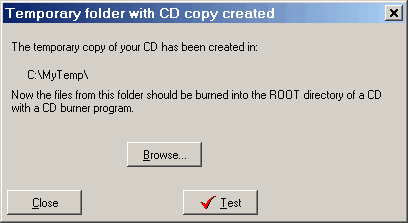
The program will show a dialog like this:
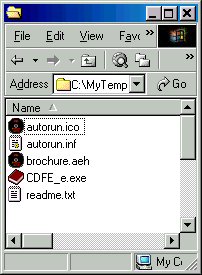
You may choose "Browse..." to take a look at the temporary copy of the CD:
And you may also use "Test" to test the CD prior to the actual burning: please understand that some features such as the
"external links" don't work in test mode.
e) Open EasyCD (or Nero, or WinOnCD) and burn the temporary folder into the root of a CD. In the simplest case, the root (= main folder, the space that does exists in the CD even if there are no specific folders) of the CD will contain the files:
autorun.ico
autorun.inf
brochure.aeh
CDFE_e.exe
readme.txt
f) Close all programs, insert the CD in the drive, and enjoy!!
That’s all. It’s really a snap!!!
Additionally, if you want you may distribute the AEH file (the work file you save with "File >Save all"). It can be read with the free
EBooksReader (TM).
It is analogous to PDF and Acrobat Reader (TM).
*this link works in the internal manual only. If you are reading the Web version of this manual, you must manually run the Windows File Explorer. Click on the Computer icon to do this. Then click on the (C) drive. Then you can create folders with the File menu (New, Folder).
Other easy software from Visual Vision:
CD FrontEnd software makes it easy to write, page, edit, protect and distribute any kind of information on CD, DVD