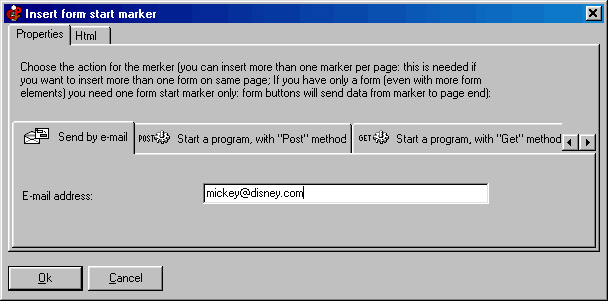
Form start marker
A form start marker is automatically inserted whenever you insert a form element. You can also use the menu “Insert” (there is no special button).
The form start marker specifies the action taken by the browser when the user presses a
“form submit” button. Click on the image to get Help:
No “form end” marker is required. In the case of your including two forms in one page, the form start marker of the second form will be also the “form end” marker for the first form.
With the available tabs you can set up the form behavior. Depending on what you choose, the data will be sent to an email address, to a server side script with "POST" or "GET" method, or will be saved on disk (a dialog window will be shown, prompting the user for the file name).
The first 3 options will work only if the user is connected to the Internet.
Other easy software from Visual Vision:
CD FrontEnd software makes it easy to write, page, edit, protect and distribute any kind of information on CD, DVD