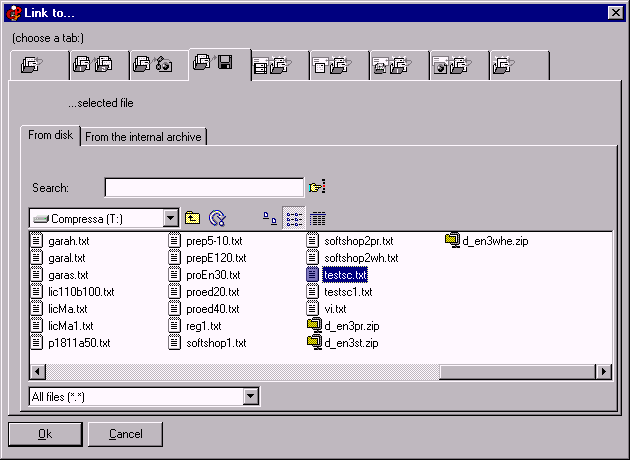
Link to an embedded file
With this tab you can include small files in the presentation/hypertext and link to them.
For large files, it is better to
insert link to external files.
Click on the image to get Help:
On the CD, this kind of link will show a dialog "Open / Save / Exit". To avoid this please see "
Insert link to external files"
.
Please see also the
run: and save: features
.
Insert links
Insert special links
Insert link to external files
See also run files
CDFrontEnd Manual
-
Main menu
-
Search
-
What is CD Front End?
-
Overview
-
Buy / register
-
Frequent questions / FAQ
-
Tutorials
-
CD passwords - protect presentation
-
Get CDFrontEnd electronically
-
Get the CDFrontEnd CD
-
User's Web forum
-
CDFrontEnd Web site
CD Front End -
Create autorun CD DVD presentations, menus with ease.
http://www.CDFrontEnd.com
(C) Copyright 2001, 2013
Visual Vision
. All rights reserved.
Since 1996, leader in hypermedia software
-
ASP
member -
ESC
member
Other easy software from Visual Vision:
HyperPublish: make a product items catalog, an hypermedia CD DVD, a Web Site
1site: build a professional Website, business ecommerce Website, no programming required
EasyWebEditor: create personal Web pages, create your Internet site with ease
EBooksWriter: write pack protect ebook exe mobi epub Kindle iPad Nook iPhone with ease!
PaperKiller: create a manual, a guide, reference manuals, documentation
RoboAuthor: manage software documentation, Helpfile, CHM, data sheets
Leader in autorun CD DVD menu software - CD presentation business product catalog brochure business card password print copy protection
CD FrontEnd software makes it easy to write, page, edit, protect and distribute any kind of information on CD, DVD