Tables 
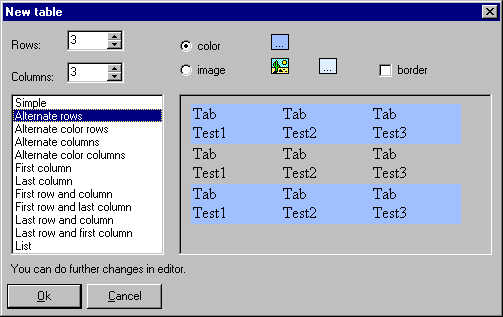
With this button you can insert tables in the text, with and without borders. The tables are the most common way to set object position on the screen (unlike DTP tools like MSPublisher, the video-publishing requires that you not use absolute - i.e. fixed - positioning of objects: this allow pages to be seen well on monitors of all sizes, from 11” to 19”). Click on the image to get Help: 
 
You can select between different color schemes. This preview shows the selected color scheme Choose here color and images for the selected color scheme  
 
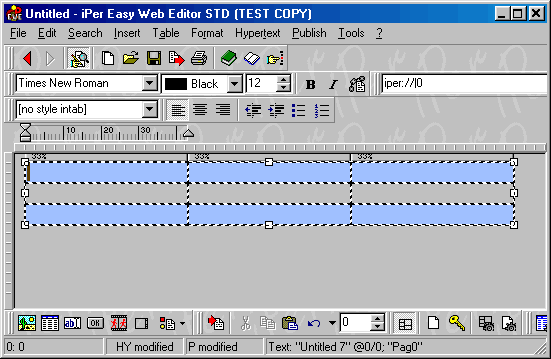
This is an example of table inserted in the editor (we have used the settings above): 
This is a table cell. With the right mouse button you can define  
 
Table examples 
 
CDFrontEnd Manual - Main menu - Search - What is CD Front End? - Overview - Buy / register - Frequent questions / FAQ - Tutorials - CD passwords - protect presentation - Get CDFrontEnd electronically - Get the CDFrontEnd CD -  User's Web forum - CDFrontEnd Web site 
 
CDFrontEnd - Create autorun CD presentations with ease.  http://www.CDFrontEnd.com 
(C) Copyright 2001, 2006 Visual Vision. All rights reserved. 
Since 1996, leader in hypermedia software - ASP member - ESC member 
 
Other easy tools from Visual Vision: 
CD Web catalog software HyperPublish: create a product catalog, an hypermedia CD, a Web Site 
create website 1site: create a professional Web site, business ecommerce Website 
Web site software EasyWebEditor: create personal Internet pages, create your Web site in minutes 
ebook software EBooksWriter: create an ebook with ease! 
manual software, documentation PaperKiller: create a manual and/or Html Help, a guide, reference manuals 
helpfile software, create online documentation RoboAuthor: manage software documentation, Helpfile, CHM 
 
Leader in auto run CD software - CD presentation catalogue brochure business card password print copy protection 
CD FrontEnd software makes it easy to write, protect and distribute any kind of info on a protected autorun CDROM! Professional brochures, cd business cards, catalogs, manuals, depliant, ebrochure, emanual, ecatalog, products items parts catalogues. You can run any kind of external file, too... PDF, PowerPoint, Word, Autocad... It is ok for content rich business brochures, art show catalogs, collections, guides, tourism and travel books, also with audio, video, animations, flash, mpeg wmv avi mp3 and much more... The perfect visual auto run / autoplay / autostart / autoinstall CD ROM presentation software! Free lite edition available.