Advanced results with beginner’s knowledge 
(< previous)  (next >)  (get CD Front End >>) 
 
CDFrontEnd is not only a fully visual application, it also has a visually pleasing user interface. Styles, colored tables, maps, mouse-over changing images, sounds, frame-sets, slides, pop-up windows, and literally hundreds of functions are all clearly available and may be used with ease. The sophisticated environment shields you from the complexities of any coding languages. The interface is extremely powerful, while being no more complex than your usual word processor. 
All features are available with a click or two of the tool buttons. 
 
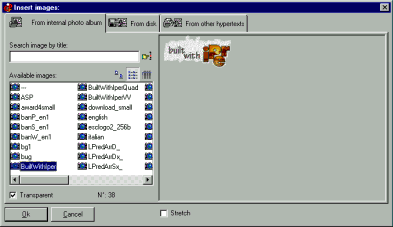
This example demonstrates the image insertion window: 
 
 
The image insertion window: note that you can quick reuse the images yet used in your current presentation/hypertext 
 
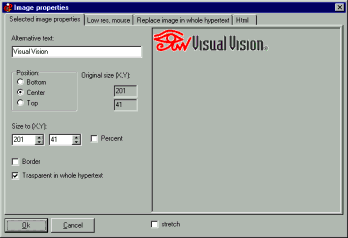
Image properties 
The image properties window; you can set a mouse-over image here (Image >Properties) 
 
(< previous)  (next >)  (get CD Front End >>) 
 
Quick tour home 
 
 
CDFrontEnd Manual - Main menu - Search - What is CD Front End? - Overview - Buy / register - Frequent questions / FAQ - Tutorials - CD passwords - protect presentation - Get CDFrontEnd electronically - Get the CDFrontEnd CD -  User's Web forum - CDFrontEnd Web site 
 
CDFrontEnd - Create autorun CD presentations with ease.  http://www.CDFrontEnd.com 
(C) Copyright 2001, 2006 Visual Vision. All rights reserved. 
Since 1996, leader in hypermedia software - ASP member - ESC member 
 
Other easy tools from Visual Vision: 
CD Web catalog software HyperPublish: create a product catalog, an hypermedia CD, a Web Site 
create website 1site: create a professional Web site, business ecommerce Website 
Web site software EasyWebEditor: create personal Internet pages, create your Web site in minutes 
ebook software EBooksWriter: create an ebook with ease! 
manual software, documentation PaperKiller: create a manual and/or Html Help, a guide, reference manuals 
helpfile software, create online documentation RoboAuthor: manage software documentation, Helpfile, CHM 
 
Leader in auto run CD software - CD presentation catalogue brochure business card password print copy protection 
CD FrontEnd software makes it easy to write, protect and distribute any kind of info on a protected autorun CDROM! Professional brochures, cd business cards, catalogs, manuals, depliant, ebrochure, emanual, ecatalog, products items parts catalogues. You can run any kind of external file, too... PDF, PowerPoint, Word, Autocad... It is ok for content rich business brochures, art show catalogs, collections, guides, tourism and travel books, also with audio, video, animations, flash, mpeg wmv avi mp3 and much more... The perfect visual auto run / autoplay / autostart / autoinstall CD ROM presentation software! Free lite edition available.